A reading log that keeps itself
Log every book, date, and rating without the spreadsheet busywork. Endleaf times your sessions, counts your pages, and turns your reading log into stats worth keeping. No account, no ads.
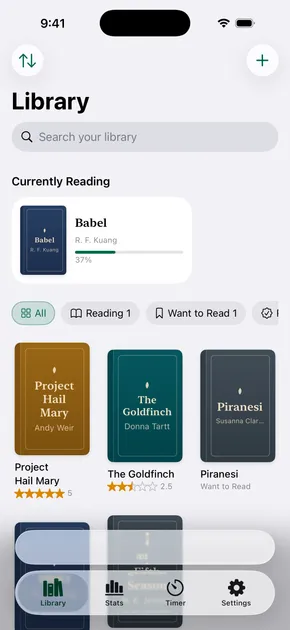
What a good reading log tracks
- Every book and date. Start and finish dates, kept at whatever precision you remember, even just the year.
- How you actually felt. Rate in half and quarter stars, add the mood and pace, and save the lines worth keeping.
- Time and pages. A built-in timer logs your sessions, so your reading speed and streaks build on their own.
- The whole year. Your log becomes charts and a year in books, ready to share or keep to yourself.
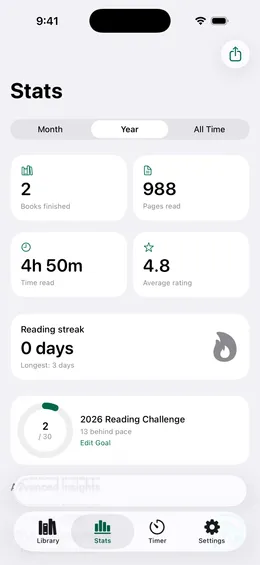
Ditch the reading log spreadsheet
A spreadsheet cannot scan a barcode, time a session, or draw your year in books. Endleaf does, and it still hands your data back as CSV anytime. Already keep a spreadsheet or use Goodreads? Import it and never type a formula again.
Every kind of reading log
Paper, spreadsheet, or app, and whether you are counting books for the year or minutes for a seven year old. Start wherever you actually are.
Printable reading log
Build a sheet in four layouts and print it, or save it as a PDF. Free, nothing uploaded.
Reading log template
A spreadsheet template with the right columns, ready to import when you outgrow it.
How to track books read
What to log, what to skip, and how to keep it to a few seconds a day.
Books read in a year
Three ways to keep the count, and the four numbers worth tracking beside it.
Reading goals
Choosing between books, pages, and minutes, and setting a target that survives February.
Kids reading log
What belongs on a school reading log, and a printable that gets filled in.
Book tracking spreadsheet
What a spreadsheet is genuinely good at, and where it quietly gives up.
Reading journal
For the other half: reviews, quotes, moods, and what you thought.
Reading log questions
What is a reading log?
A reading log is a record of the books you read: titles, dates, ratings, and often pages or time spent. Readers keep one to remember what they have read, see patterns over a year, and stay motivated. Endleaf is a reading log that fills itself in as you read.
How do I start a reading log?
Pick where it lives before you pick what goes in it. Print a sheet, open a spreadsheet, or install an app, then log three things per book: the title, the dates, and what you thought. Add pages and a rating when you want the year to add up. The one that works is the one that is nearest when you finish a chapter.
What should a reading log include?
At minimum the title, the author, and the date you finished. Add a rating and a page count if you want end-of-year stats, and start and finish dates if you want to know how long books actually take you. School and kids logs usually track minutes read instead of pages.
Is a reading log app better than a spreadsheet?
A spreadsheet is free but manual, and it cannot time your sessions, scan a barcode, or build charts on its own. Endleaf does all of that, keeps your data on your device, and still lets you export to CSV. If you already keep a spreadsheet, you can import it and stop doing the math by hand.
Is there a free printable reading log?
Yes. Our printable reading log maker builds a sheet in reader, kids, minimal, or journal layouts, on Letter or A4, and prints or saves as a PDF. It is free, it runs in your browser, and it does not ask for an email.
Can I keep my reading log private?
Yes. Endleaf has no account and no feed. Your log lives on your iPhone and syncs only through your own iCloud, so no one else sees what you read.
Can I export my reading log?
Always. Export the whole log as JSON or CSV whenever you want. Your reading history is yours to keep and to move.
Keep a reading log you will actually keep up.
Endleaf does the logging for you. Free to download, private by design.
No account. No ads. Your data stays on your phone.